ᵡ-SOM
ChemInformatics SOM Toolkit
ᵡ-SOM is a high-performance framework for training emergent self-organizing maps (ESOMs) with a specific focus on cheminformatics; including on-disc, low-latency data storage and a GUI.
It was specifically developed for visualising the chemical space of million-scale molecular datasets and for interactive exploration.
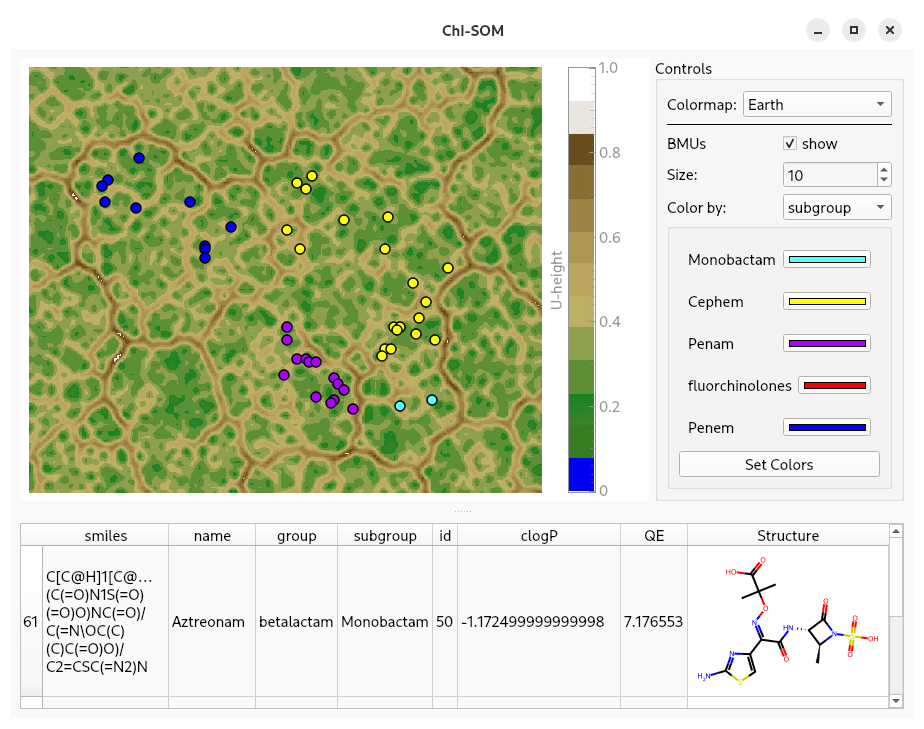
- Scales to millions of molecules — a dedicated HDF5 layout gives random, millisecond-latency access to fingerprints that do not fit in memory, through the PyTorch
DataLoaderinterface. - CPU and CUDA backends — numba-compiled training on either, selected with a single flag.
- Interactive exploration — an interactive viewer for colouring, filtering and inspecting the molecules behind every unit of a trained map.
Installation
Currently, ChI-SOM is only available for Linux, and Windows using WSL2.
It can be installed directly from PyPI
pip install chi-som
The interactive viewer is an optional extra and is not part of the base install
pip install 'chi-som[gui]'
For the CUDA compute backend, numba-cuda-mlir is required.
On systems running CUDA, ChI-SOM can be installed with CUDA support via
pip install 'chi-som[cu12]'
pip install 'chi-som[cu13]'
Please refer to the numba-cuda-mlir documentation for more complex setups.
Extras combine, e.g. pip install 'chi-som[cu12,gui]'. Full details, including the development setup and troubleshooting, are in the installation guide.
Documentation
Documentation for ChI-SOM is available at https://kochgroup.github.io/ChI-SOM/
Usage example
import numpy as np
import pandas as pd

from chisom import Som, start_chisom_viewer
from chisom.utils import lattice_size

data = np.random.random((600, 400))

# Set up with ESOM rules
n_datapoints, n_features = data.shape
rows, columns = lattice_size(n_datapoints)

# Create a SOM object
# The high and low parameters should be chosen according to the dataset values
som = Som(
    rows,
    columns,
    n_features,
    low=data.min(),
    high=data.max(),
)

N_EPOCHS = 30

# Train the SOM for all epochs in a single call
som.train(data, N_EPOCHS, 0.8)

# Get the U-Matrix, shape (n_layers, rows, columns)
umx = som.umatrix

# Predict the best matching units and quantization errors for all data points
bmus, qe = som.predict(data)


# Using the GUI needs information to overlay on the datapoints
dataset = pd.DataFrame.from_dict(
    {"Type:": ["A"] * len(data)}
)

# Start the GUI
start_chisom_viewer(umx, bmus, dataset)
For instructions on how to train SOMs on large dataset using the PyTorch DataLoader interface, please refer to the How-To Guides section.
Viewing a trained SOM from the command line
Once a U-Matrix and the BMUs have been saved to disk, the viewer can be opened directly, without writing a script:
chisom view -u umx.npy -b bmus.npy -d dataset.h5 --groups active --structure-column smiles
Every argument is optional — a bare chisom view opens an empty window and everything can be loaded from its File menu instead. See The Viewer for the full set of options and what the interface can do.
Caveats
- The Viewer will only work on a systems with a display attached. When running the application on a server via a remote shell and calling
start_chisom_viewerthis will usually lead to errors ("This application failed to start because no Qt platform plugin could be initialized"). As solutions to this are very setup dependend, the recommended approach for very large SOMs is to only train the SOM on a powerful remote machine and analyse the trained SOM with the GUI locally. - This software may be considered to be in beta stage. While the user-facing API is expected to remain stable up to a 2.0 release, the internal API might change at any release and can not be considered stable.
The full list is documented under Limitations.
Development Setup
ChI-SOM is developed, built, and packaged using Astral uv
To set up a development environment initalize with
uv sync --group dev --extra gui
To build run
uv build
See the installation guide for the CUDA variants and the full task list.
Meta
Authors: Johannes Kaminski, Oliver Koch @ AG Koch
Contact: j.kaminski[at]uni-muenster.de
ChI-SOM is distributed under the LGPLv3. See LICENCES for more information.